
eAssistancePro Live Chat Tool1.4 - Download
You'll be able to download in few seconds.
Publisher Description
eAssistance Pro combines all the attractive features of an excellent Live Chat software and visitor monitoring solution. eAssistance Pro simply raises the customer service level and online user satisfaction level.
Getting started with eAssistance Pro is a cakewalk. Just create a free account, insert the preferred chat code in website and download the operator console to provide adept customer service. It can be quickly integrated in any kind of website through plugins and widgets – be it CMS based or shopping cart based. It also allows visitors to chat directly from any website’s Facebook page. It is highly customizable as users can customize the visitor chat start form, chat panel, chat images, auto-invitation images, feedback form, and more.
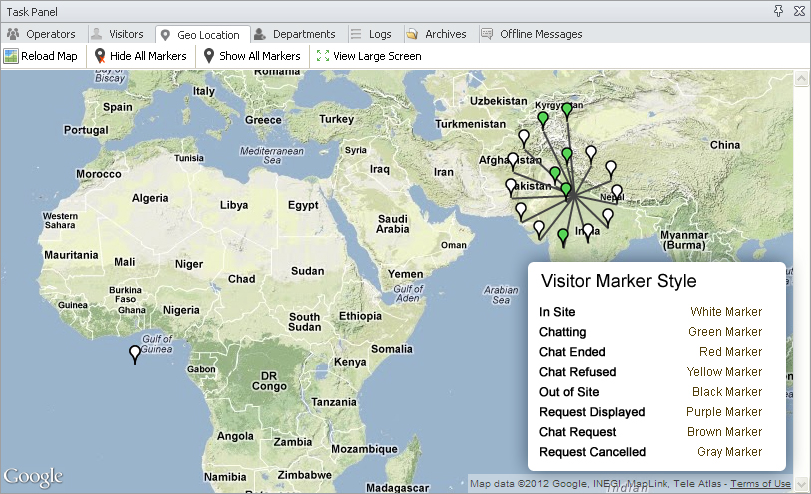
eAssistance Pro has myriads of features. Operators assist customers through operator consoles which is available in two variants – the web-based and standalone console. It allows multitasking by letting operators handle multiple chat sessions. It also supports multiple instance login from the same system. Geo-mapping and traffic stats are a great way to know about online visitors and proactively target them for better sales. Other features include chat invitation, file transfer emoticons, offline messages, spell checker, canned responses, archives, chat transcripts, and more.
eAssistance Pro is highly secure and it features 256-bit SSL security for advanced security against online data misuse. It is available for free 15 days trail. Use it to personally get acquainted with the software and its features. For more information regarding product features, visit www.eassistancepro.com/features/live-chat.php
About eAssistancePro Live Chat Tool
This Chat & Instant Messaging program is available in English. It was last updated on 29 September, 2026. eAssistancePro Live Chat Tool is compatible with the following operating systems: Windows.
The company that develops eAssistancePro Live Chat Tool is Live Chat Software. The latest version released by its developer is 1.4.
The download we have available for eAssistancePro Live Chat Tool has a file size of 13.6 MB. Just click the green Download button above to start the downloading process. The program is listed on our website since 2013-11-01 and was downloaded 0 times. We have already checked if the download link is safe, however for your own protection we recommend that you scan the downloaded software with your antivirus. Your antivirus may detect the eAssistancePro Live Chat Tool as malware if the download link is broken.
How to install eAssistancePro Live Chat Tool on your Windows device:
- Click on the Download button on our website. This will start the download from the website of the developer.
- Once the eAssistancePro Live Chat Tool is downloaded click on it to start the setup process (assuming you are on a desktop computer).
- When the installation is finished you should be able to see and run the program.
Program Details
System requirements
Download information
Pricing
Version History
version 1.4
posted on 2013-11-01
Disclaimer
External Download
We do not host eAssistancePro Live Chat Tool on our servers. We did not scan it for viruses, adware, spyware or other type of malware. This app is hosted by the software publisher and passed their terms and conditions to be listed there. We recommend caution when installing it.
The external download link for eAssistancePro Live Chat Tool is provided to you by apps112.com without any warranties, representations or guarantees of any kind, so access it at your own risk.
If you have questions regarding this particular app contact the publisher directly. For questions about the functionalities of apps112.com contact us.
